How to Turn a Voice Recording Into a QR Code
Put a voice memo, a voicemail or any audio file behind a QR code that plays in the browser. Getting the file out, what to print it on, who can hear it, and how long it lasts.
The first problem is usually not the QR code. It is that the voice recording is not a file yet.
A voice memo on an iPhone, a message sitting in your carrier's voicemail box, a clip inside a chat thread — none of those are things you can upload until you get them out. That step stops more people than the code itself, so it goes first.
Getting the voice recording out as a file
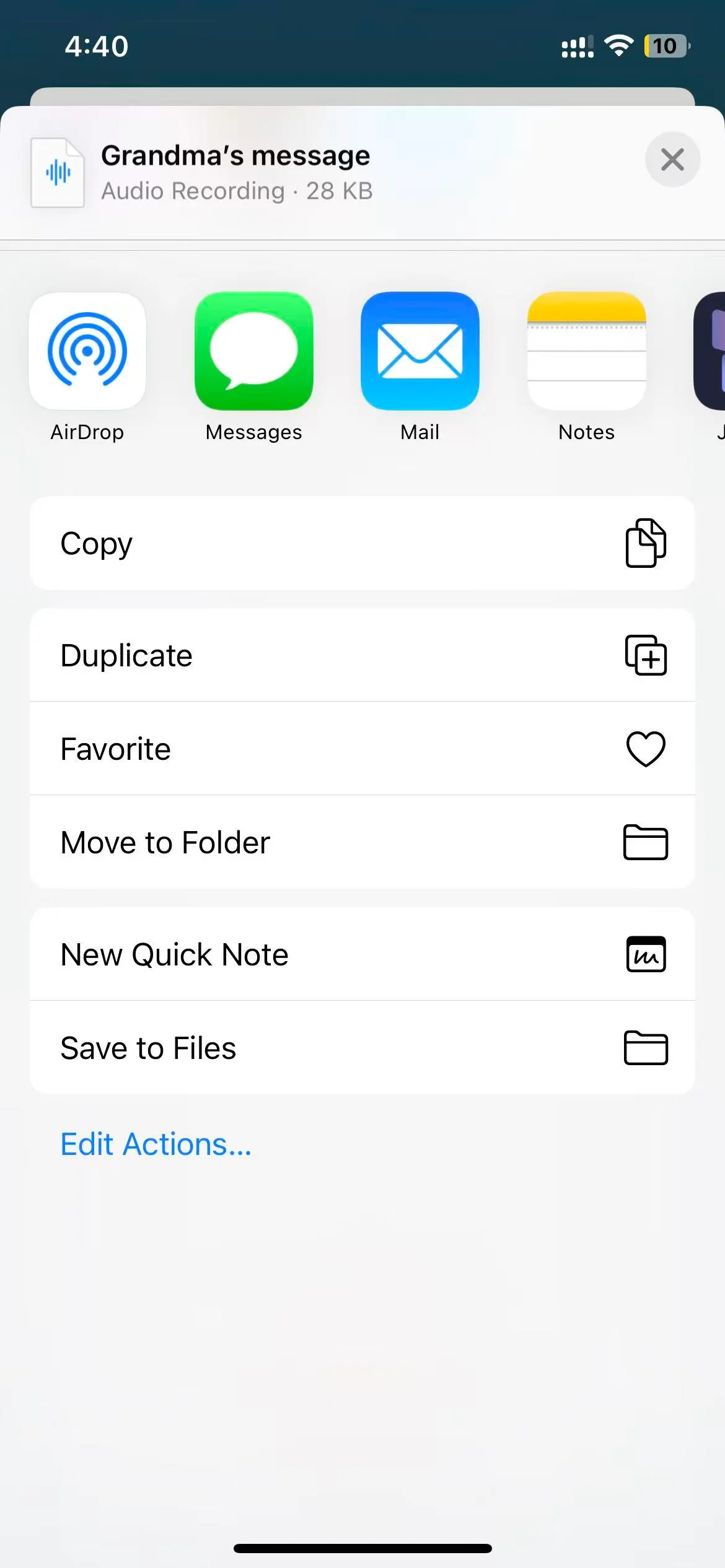
iPhone Voice Memos. Open the recording, tap the three dots, choose Share, then Save to Files. You get an .m4a. That format works as it is — no conversion needed.
Android. Recorder apps differ by manufacturer, but each one has a share or export action that drops the file into Downloads or Drive. Samsung's Voice Recorder saves .m4a. So does Google's Recorder.
A voicemail. This is the one with no clean answer, and it is also the most common reason people come looking. Whether you can export a voicemail at all depends on your carrier, and there is no rule that holds everywhere.
Visual voicemail on iPhone lets you share a message the same way as a voice memo — open the message, tap the share icon, save to Files. Some Android carriers offer the same. Others keep the message on their own server and give you no export at all.
When there is no export, the workaround people actually use is to play the voicemail on speaker and record it with a second phone. The quality drops. If the recording matters — a parent's last message, a grandparent's voice — a slightly muffled copy that exists beats a pristine one that vanishes when the mailbox is cleared. Do this before you cancel the line.
A voice message in WhatsApp, Telegram or Messenger. Long-press the message and look for save or export. WhatsApp exports .opus in some versions, which we do not accept. If that happens, run it through any online audio converter to MP3 — that is a thirty-second detour, not a dead end.
Once the recording is a file on your phone or computer, the rest takes about a minute.
When the voice recording is too long or too big
The cap is on file size, not running time: 3 MB without an account, 10 MB with a free one.
At normal voice-memo quality that works out to roughly three minutes and ten minutes. The number moves with the format. An uncompressed WAV of a two-minute message can be 20 MB on its own, while the same two minutes as an M4A sits under 2 MB — so before you assume the voice recording is too long, check what format it actually is.
If it genuinely is too big, three things work:
Convert it. WAV or AIFF to MP3 at 128 kbps cuts the size by roughly ten times and voice survives it fine. Any free online converter does this.
Trim it. Most of a saved voicemail is often the carrier's automated preamble and a few seconds of silence at the end. iPhone's Voice Memos has a trim tool built in — open the recording, tap Edit, drag the handles.
Split it. Two codes, two halves. Less elegant, but if the recording is an hour of an interview and you want it all, it is the honest answer.
Making the QR code
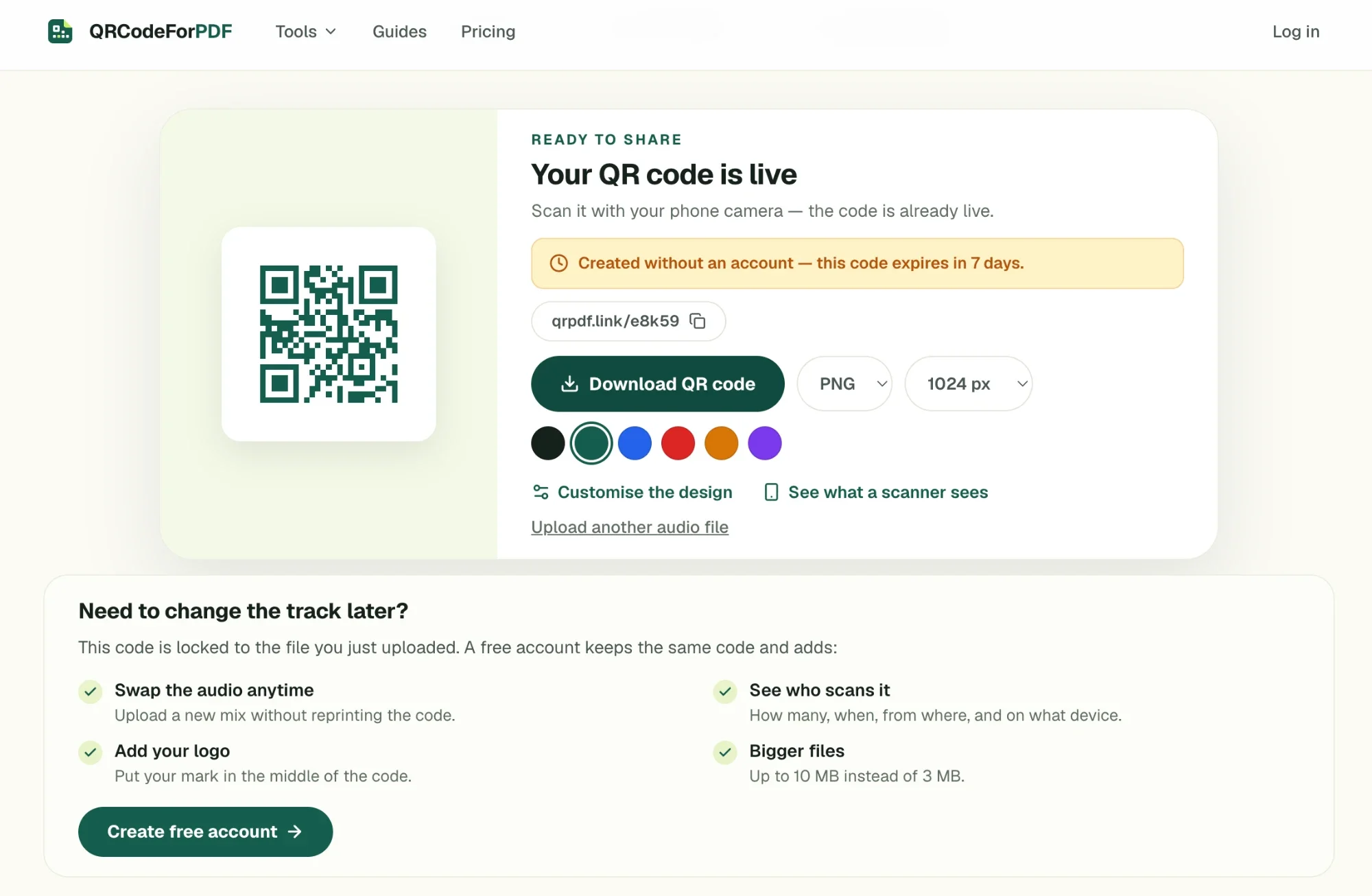
Open the audio QR code generator, drop the file in, and the code appears while you are still looking at the page. No account, nothing to install.
MP3, WAV, M4A and AAC all upload as they are. There is no re-encoding step, so what a listener hears is the recording you made, not a compressed copy of it.
What ends up inside the QR code is a short link, not the audio itself — which is what makes the next two sections possible at all.
One thing to decide before you print anything: a code made without an account works for 7 days. Signing up inside that window makes it permanent — same code, same short link, nothing to reprint. If the code is going onto something you are keeping, register first.
What to print the QR code on
The QR code has to survive whatever it is printed on, and the material decides the size.
Size follows scan distance. The rule people use is 10:1 — divide the distance someone will scan from by ten to get the minimum width. A card held in the hand is scanned from about 20 cm, so 2 cm of code is enough. A framed print on a wall gets scanned from a metre away, which needs 10 cm.
Contrast beats decoration. Dark code on a light background. A pale grey code on cream paper looks tasteful and fails on half the phones that try it.
On vinyl and cut materials. Cricut and similar cutters can cut a QR code out of vinyl, and it works — but keep the modules chunky. Fine detail is where a blade loses accuracy, and a code that scans on screen can fail once it is cut. Raise the error correction level to H before you export, and test the cut piece with a phone before you make twenty of them.
On acrylic, wood and engraved surfaces. The risk is reflection rather than resolution. A glossy engraved plaque throws light back at the camera and the phone sees a white square. Matte finishes scan; polished ones are a gamble.
Whatever the material, do a test scan of the finished object, not of the file on your screen.
What the person scanning the QR code gets
They point a camera. A page opens with your title, and a play button.
That page is ours, not a file download. The audio streams from our server into their browser — no app, no store page, no account on their end. Underneath the player there is a download link, and that link cannot be switched off, so treat anything behind a printed code as something a listener can keep.
Two things people expect that do not happen:
It does not start playing by itself. Mobile browsers block sound that starts without a tap, and no generator can override that. Label the printed code so the tap is expected — "Scan to listen, 90 seconds" does the work.
It needs a connection. The file streams on each scan rather than living on the phone. At a graveside with no signal, in a basement, in a stone-walled venue, a scan gets an error instead of audio.
Who can hear it, and how long it lasts
If the voice recording is private — a family message, someone's voice you are keeping — these are the two questions worth having a real answer to.
Search engines are told not to index it. Every page served on the scan domain carries X-Robots-Tag: noindex. Nobody finds the recording by searching for it; the only way in is the code itself, or someone forwarding the link.
A passphrase is the control that actually holds. On Pro, you can put a passphrase in front of a code. It is checked on our server before the file is sent, so it is not a UI trick — without the phrase, the request is refused. Use it if the code is going somewhere semi-public, like a memorial card handed around at a gathering.
How long it lasts. A code held by an account has no expiry date. It keeps resolving as long as the account exists, and every earlier version of the file is kept, so a re-upload can be rolled back.
That is the honest limit of what any hosted service can promise, including this one: the code works as long as somebody is running the server behind it. For something you intend to keep for decades, keep the original audio file somewhere of your own as well — a drive, a backup, a copy with a family member. The QR code is how people reach the voice recording. It is not where the recording lives.
If the thing you want behind a code is a document rather than a recording, the steps for a PDF are the same shape with a different file — and if you want to know why a printed code can point somewhere new without being reprinted, that is worth understanding before you commit to a print run.