QR Code Not Scanning? Is It the Print, the Phone or the Link
A QR code that will not scan failed at the phone, the link or the print. 2 tests of 1 minute each tell you which, and the print fixes come with numbers.
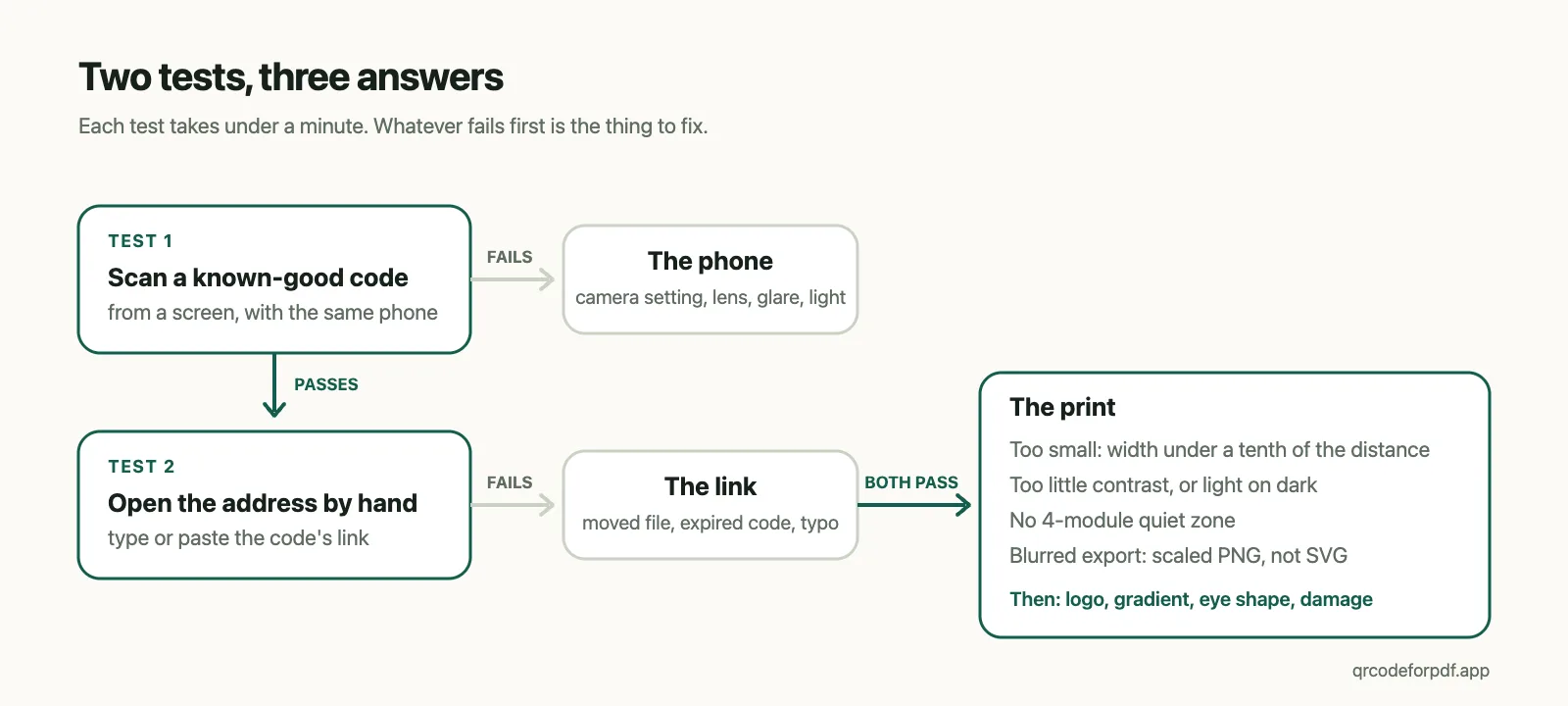
When a QR code is not scanning, it has failed in one of 3 places: the phone, the print, or the link behind the code. 2 tests separate them. Scan a code you know works, from a screen, with the same phone. Then open the printed code's address by hand. Each takes under a minute, and between them they say which of the 3 to fix.
TL;DR: Test 1: scan a known-good QR code from a screen with the same phone; if that fails, the phone is the problem. Test 2: open the code's address by typing or pasting it; if that fails, the link is the problem. If both pass, the print is the problem, and on a printed code that nearly always means one of 4 things: too small for the scanning distance, too little contrast, no quiet zone, or a blurred export.
Test 1: is it the phone?
Put any QR code you know works on a screen, a Wi-Fi code or a payment code will do, and scan it with the phone that failed.
If that fails too, the printed code is not the problem yet. On an iPhone the Camera app reads a QR code on its own: hold the phone so the code is in frame and tap the link that appears, and Apple's page shows how to add a Scan Code control to Control Center for the times the camera does not offer it (Apple Support). On Android, Camera from Google has a QR mode and Chrome's address bar has Google Lens; Google's own advice is a steady hand, good light, and about a foot away (Google Help). Some phones keep scanning behind a switch in the camera app's settings, and that switch is worth checking before anything else.
A dirty lens, glare on a glossy print and a shaking hand all show up in this test as well, and they are the cheap fixes: wipe, tilt, hold still.
If the known-good code scans and yours does not, the phone is fine, and the next test is the address.
Test 2: is it the link?
Read the address the code carries and open it by hand. For a static code that is the full URL; for a dynamic code it is a short link, and the generator's dashboard shows it. If the address does not load in a browser, no amount of reprinting will help. A static code whose file has moved cannot be repaired, only replaced. A dynamic code that lands on a "deactivated" notice, an advertisement or the provider's home page has run into a trial or a plan, which is its own subject: do QR codes expire?
There are 2 more outcomes here. The phone reads the code and opens the wrong thing: that is a typo at creation, and the code is doing its job with the address it was given. Or the phone reads the code and nothing opens at all: a dynamic code needs a connection to resolve its short link, so a basement, a plane or a dead patch of signal looks exactly like a broken code and is not one.
If the address loads, the link is fine, and what remains is the print.
If both pass, it is the print
4 causes cover nearly every printed QR code that won't scan for a healthy phone. Each has a number attached, and the numbers are what to check.
Too small for where people stand
The rule of thumb used across the industry is 10 to 1: the code's width should be at least a tenth of the distance it will be scanned from, so a poster read from 3 metres wants a code 30 cm across (Uniqode's size guide). At arm's length the floor most vendors quote is 2 by 2 cm (Bitly). In practice that puts a table tent read from 40 cm at 4 cm, a shop-window card read from 1.5 metres at 15 cm, and a code on a lamp-post poster read from across a pavement at something closer to a sheet of paper than a stamp.
Size is only half of it, because what the camera has to resolve is the individual module, and the number of modules depends on how much the code encodes. Measured with this site's own encoder at error correction level M:
| What the code encodes | Length | Modules across |
|---|---|---|
This site's short link (https://qrpdf.link/z6cgq) | 24 characters | 25 |
| A typical Google Drive share link | 83 characters | 37 |
| A typical Dropbox share link | 107 characters | 45 |
| A 300-character URL | 300 characters | 69 |
Printed at the same 2 cm, the modules of the 69-wide code are little more than a third the size of the 25-wide code's, and that is the code that scans on the designer's monitor and fails on the flyer. The printer has a floor of its own: DENSO WAVE's worked example gives 4 printer dots per module, which at 400 dpi is 0.254 mm per module (DENSO WAVE). At a 300 dpi office printer the same 4 dots are 0.34 mm, so a 25-module code with its 4-module margin on each side, 33 modules in all, cannot honestly be printed smaller than about 1.1 cm, and a 69-module code with its margin not smaller than about 2.6 cm. A long static URL is a small-print problem before it is anything else, and the fix is a shorter address, which in practice means a dynamic code.
Too little contrast, or the wrong way round
Scanners look for dark modules on a light background. A light code on a dark background reads on some phones and not others, and the safe assumption is that it does not; the same vendor page puts the contrast floor at about 40% darker than the background (The QR Code Generator). This site's renderer uses a luminance ratio instead and will not draw a module colour that falls under 3 to 1 against its background, the same arithmetic as the WCAG contrast check. That guard exists because of a single measurement: a gradient running out to a pale green, #C9F26D on white, decoded at the lower error-correction levels and stopped decoding once the level raised the code's density enough.
Glare is contrast failing at the moment of the scan rather than in the design. Glossy stock, lamination and clear plastic all put a reflection over part of the code. Matte paper for anything scanned under overhead lights, and a tilt of the phone when it is too late for that.
No quiet zone
DENSO WAVE, who invented the code, put it plainly: "QR Code requires a four-module wide margin at all sides of a symbol" (DENSO WAVE). The margin is part of the code. Designers crop it to fit a layout or run the code up against a border, a photo or a coloured panel, and the scanner cannot find the edges. The export from this site keeps 4 modules of margin around every code, and the layout has to keep them too.
A blurred export
A PNG exported small and enlarged in the layout arrives at the printer as soft grey edges, and the camera cannot tell where one module ends. Vendors ask for 300 dpi and at least 1,000 pixels (Bitly). The cleaner rule is to give a printer a vector. The SVG export here scales to any size without softening, and the PNG comes in 512, 1,024 or 2,048 pixels for screens.
Damage, logos and decoration
Error correction is why a scuffed code still reads. Level L can restore 7% of the data, M 15%, Q 25% and H 30% (Wikipedia), and everything below is spending that budget.
A logo deletes the modules under it. This site raises the level to H the moment a logo is added and keeps the logo to at most 30% of the code's width, 22% by default, so the deleted modules can be rebuilt from the rest. A gradient spends the budget more quietly, because contrast varies across the code: measured here on 2026-08-22, a gradient at level L stopped decoding while the same gradient at M did not, so the renderer raises L to M whenever a gradient is on.
Rounded or circular corner eyes are off the specification. The 144 combinations of module shape, eye shape, level and gradient this site offers were run through 3 decoders before shipping. All of them decode under Chrome's BarcodeDetector and the ZXing family that Android's scanner and most apps are built on, and none of the rounded or circular eyes decode under OpenCV's detector, which matches a square finder and rejects anything else. Rounded eyes are common across generators and the practice is established, but the default here is the plain square and it is the only eye a free visitor can pick. If a code has to read on every scanner ever written, keep the eyes square.
What error correction usually cannot save is a finder pattern. A scratch or a fold across one of the 3 big corner squares defeats most decoders at any level, because the finders are how a scanner locates the code before it reads anything.
Before the next print run
- Create the code at its final size in the layout, not scaled up afterwards.
- Export SVG for print and PNG for screens.
- Keep the 4 modules of margin.
- Print 1 copy and scan it from where people will stand, not from the desk; the how-to guide has the rest of that routine.
QRCodeForPDF is a free, browser-based generator that turns a PDF or an audio file into a dynamic QR code with a hosted page; codes created without an account expire 7 days after creation, codes held in a free or Pro account have no expiry date, and the file behind a printed code can be replaced without reprinting. For a code from it, the density question is already settled: every code encodes a 24-character short link, so it is 25 modules across at level M whatever the size of the PDF behind it, and the gates above run before the download button does. What this site cannot do is fix a phone, or make a 300-character static code scan at 2 cm. What it does instead is keep every code at 25 modules, so if the code you printed failed Test 2 rather than the print checks, create a new one and put it over the old with a sticker.