Do QR Codes Expire? How Long a Printed Code Keeps Working
A QR code never expires on its own, but the service behind a dynamic one can. What 6 generators do when a trial or plan ends, with sources, and how to test.
Do QR codes expire? The printed pattern does not. A QR code is data drawn as squares, and a phone reads it the same way whether it was printed this morning or 10 years ago. What can expire is what the pattern points at: a short link that a company has to keep answering, a file that has to stay online, or a subscription somebody let lapse. How long your code lasts depends on which of those it leans on, and on whose terms.
TL;DR: A QR code never expires by itself. A static code carries its destination inside the pattern and works for as long as that address exists. A dynamic code carries a short link and works for as long as the company behind the link keeps redirecting it, which is where free trials, lapsed plans and scan caps come in. On this site, a code created without an account expires 7 days after creation; a code held in an account has no expiry date.
The pattern cannot expire, and codes cannot run out
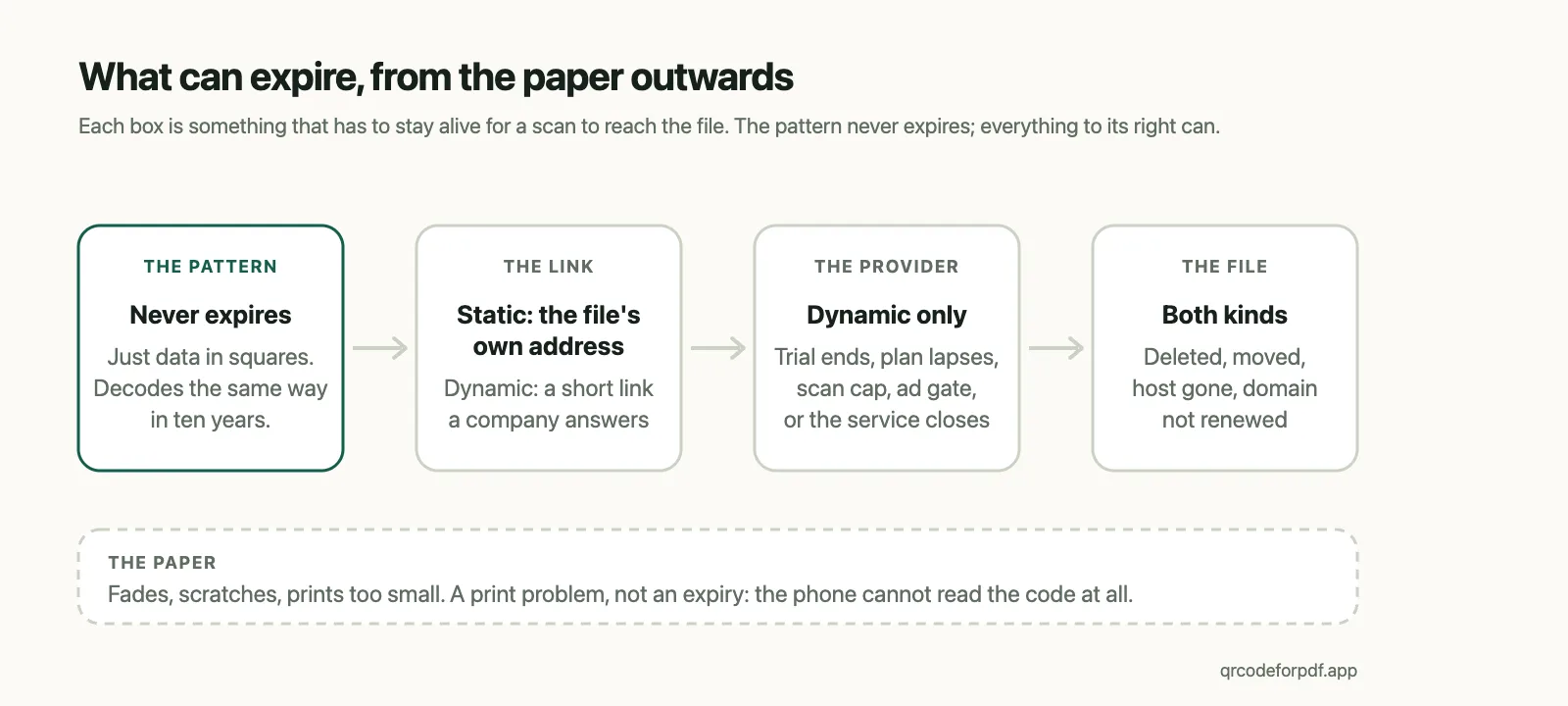
There is no clock inside a QR code. The squares encode a string of characters, the phone's camera decodes them on the spot, and nothing about that step touches a server or a calendar. A code that scanned in 2015 still scans, and it will go on scanning after the paper has yellowed, for as long as the print is readable.
2 of the questions Google shows under this search have the same answer. Will we ever run out of QR codes? No. The largest version of the standard, version 40, is a 177 by 177 grid that holds up to 2,953 bytes, and any address that fits can be encoded into as many separate codes as anyone cares to print; nobody hands them out from a registry. Can a code have an expiry date built into it? Also no. Expiry is always a property of whatever the code points to.
That distinction is the whole article. For the anatomy of the squares themselves, the finder patterns and the error correction, see how QR codes work. From here on the only question is what has to stay alive at the other end.
What has to stay alive: an address, or a company
A static code has the destination written into the pattern. Scan it and the phone opens https://example.com/menu.pdf directly. Nobody sits in between, so the code works for exactly as long as that address works. If the file moves, the code is dead and cannot be repaired; if the file stays, the code outlives every generator on the internet.
A dynamic code has a short link written into it, something like qrpdf.link/6rxwc. Those characters mean nothing on their own. A server has to receive the scan and answer with a redirect to wherever the file currently lives. That is what makes the code editable and trackable, and it is the only reason a QR code can ever "expire": the company running that server can stop answering.
So "how long do QR codes last" turns into a question back. Who has to stay alive for yours to work? For a static code, whoever hosts the file. For a dynamic code, whoever hosts the file and the QR provider, on whatever terms the provider sets.
The 5 ways a dynamic code expires
Every dynamic code that has ever "expired" died in one of these ways.
- The trial ended. Several generators let you create dynamic codes on a 14-day trial. When it ends the codes are switched off, and the short link answers with the provider's own page instead of your file.
- The plan lapsed. A paid subscription stops, and the codes on it stop with it, sometimes after a grace period, sometimes not.
- A free tier hit its limit. Some free plans cap scans, some show an advertisement before the redirect, some keep only a handful of codes active.
- The provider closed, or moved domains. The short link's domain is the code. If it stops resolving, every code printed with it goes dark at once, however healthy the destination file is.
- Somebody deleted it. The code, the short link, or the file behind it.
None of these leave a mark on the paper, and an expired code looks exactly like a live one, so the only way to know is to scan it or to read the policy before you print.
What the big generators actually do when a trial or plan ends
Vendor blogs answer "do QR codes expire" in the abstract and leave out their own policy. These are the policies, in the vendors' own words, with the pages they come from. Checked on 2026-09-18; the links are there so you can check again on the day you print.
| Generator | Free codes are | When the trial or plan ends |
|---|---|---|
| QR Code Generator (qr-code-generator.com) | Dynamic, on a 14-day trial | "Dynamic QR Codes are deactivated and point to a service page rather than the original destination." Static codes "continue to work", and upgrading reactivates the dynamic ones. Source |
| The QR Code Generator (the-qrcode-generator.com) | Up to 2 dynamic codes, plus static | The 2 dynamic codes stay active, but "users scanning these codes will encounter a 3-second advertisement before being redirected to the destination page." Source |
| Bitly | Dynamic | "the QR Codes you create in Bitly never expire" and "a Bitly Code stops working if you delete it or the associated short link." Source |
| Canva | Static and dynamic | No expiry "unless you set one"; an expiry date and time is a setting for dynamic codes on Canva Business, Enterprise and Nonprofit. Source |
| Adobe Express | Static only | "QR codes created in Adobe Express are static and do not expire," and cannot be pointed at a different address afterwards. Source |
| Google Chrome (Share, then QR code) | Static | Chrome creates the code on your device from the page's own address; there is no account and no redirect service behind it to lapse. Source |
| QRCodeForPDF (this site) | Dynamic | Without an account, a code expires 7 days after creation. In a free or Pro account, no expiry date. Plans |
Read across the table and a pattern shows. On qr-code-generator.com, the dynamic codes created during the 14-day free trial are deactivated when it ends and send scanners to a service page, while static codes created there keep working. Bitly's support page says its QR codes never expire and stop only if you delete the code or its short link. The QR Code Generator keeps 2 free dynamic codes running but puts a 3-second advertisement in front of every scan. Canva's and Adobe Express's codes have no expiry unless a Canva Business account sets one, and Adobe's are static, which also means they can never be edited.
The free tier that never expires is nearly always the static one, and the free dynamic codes come with a catch: a trial, an advertisement, or a cap. Editable, free and permanent rarely arrive together, and when a page promises all 3 it is worth finding the help-centre article that says what happens on day 15.
What someone sees when they scan an expired code
The phone does not know the code has expired. It decodes the short link and opens it, and what appears is whatever the provider answers with: a "this code has been deactivated" notice, a page selling the service, an advertisement, or a plain 404. Scanning an expired QR code never produces an error from the phone itself; the failure is always a web page.
Here, a code past its 7 days opens a page headed "This QR code has expired". Under it, a note addressed to whoever created the code says that codes created with a free account never expire and offers to create a permanent one, so the person who printed it can fix it from the page the scan lands on, and the person holding the paper gets a plain explanation rather than an advertisement.
How to know before you print
- Find the vendor's help-centre page on trials and expiry, not the blog post. Search it for the word "deactivated". The table above is a start.
- Create the code, log out, and scan it from a phone. If the provider runs a trial, the only complete test is scanning after the trial ends, and a help-centre page that says what happens then is the next best thing.
- Print a small batch first and keep the source file, so a dead code costs a sticker rather than a print run.
- For anything that has to outlive every company involved, print a static code to an address you own.
If a code is already printed and already dead, the choices are the ones the table implies: pay to reactivate it where the vendor allows that, or put a sticker with a fresh code over the old one.
One thing this list does not cover: a phone that cannot read the code at all. That is a print problem, not an expiry, and it comes down to size, contrast and damage, which the last section of the how-to guide walks through.
What this site does, and what it will not promise
QRCodeForPDF is a free, browser-based generator that turns a PDF or an audio file into a dynamic QR code with a hosted page; codes created without an account expire 7 days after creation, codes held in a free or Pro account have no expiry date, and the file behind a printed code can be replaced without reprinting. Every code created here is dynamic, and replacing the file behind a printed one is free on every plan. That is the point of the product, and it is also why the expiry question has to be answered plainly rather than with "never".
- Created without an account: the code expires 7 days after it is created. The clock is set at creation. Creating a free account inside that window keeps the same code and the same short link permanently, so nothing needs reprinting.
- Held in an account: no expiry date and no trial. The free plan's 3 codes stay active indefinitely, and Pro holds 100. A saved code keeps resolving unless you delete it, or unless a Pro subscription lapses while the account holds more codes than the free plan includes — and even then only after a 30-day grace period, and only the least-scanned codes above the free allowance. Those are paused, not deleted: resubscribe and they come back exactly as they were.
- On every scan: the file opens in the browser with no advertisement, on the free plan included.
The 7 days exist because a code is created for someone else. A flyer printed on Friday is often first scanned on Monday, so the window covers creating a code, sending it, and having it opened at the far end. Permanence is tied to an account for a plainer reason: a code nobody owns cannot be found again, replaced, or taken down.
What I cannot tell you is which QR host will still be resolving short links in 10 years. This one is new, and no provider in that table can promise a decade either. If a printed code has to outlive that uncertainty, print a static code to an address you own, and keep a sheet of stickers for the day one of the others goes dark. For everything else, create the code, look at the clock on the result page, and decide about the account before the paper goes to the printer.