QR Code on a Resume: When It Helps, Where It Goes, How Small It Can Be
Put a QR code on the resume you print, not the one you upload. In a scan test, a 2 cm code still read from 45 cm after a photocopy; a 1 cm code did not scan.
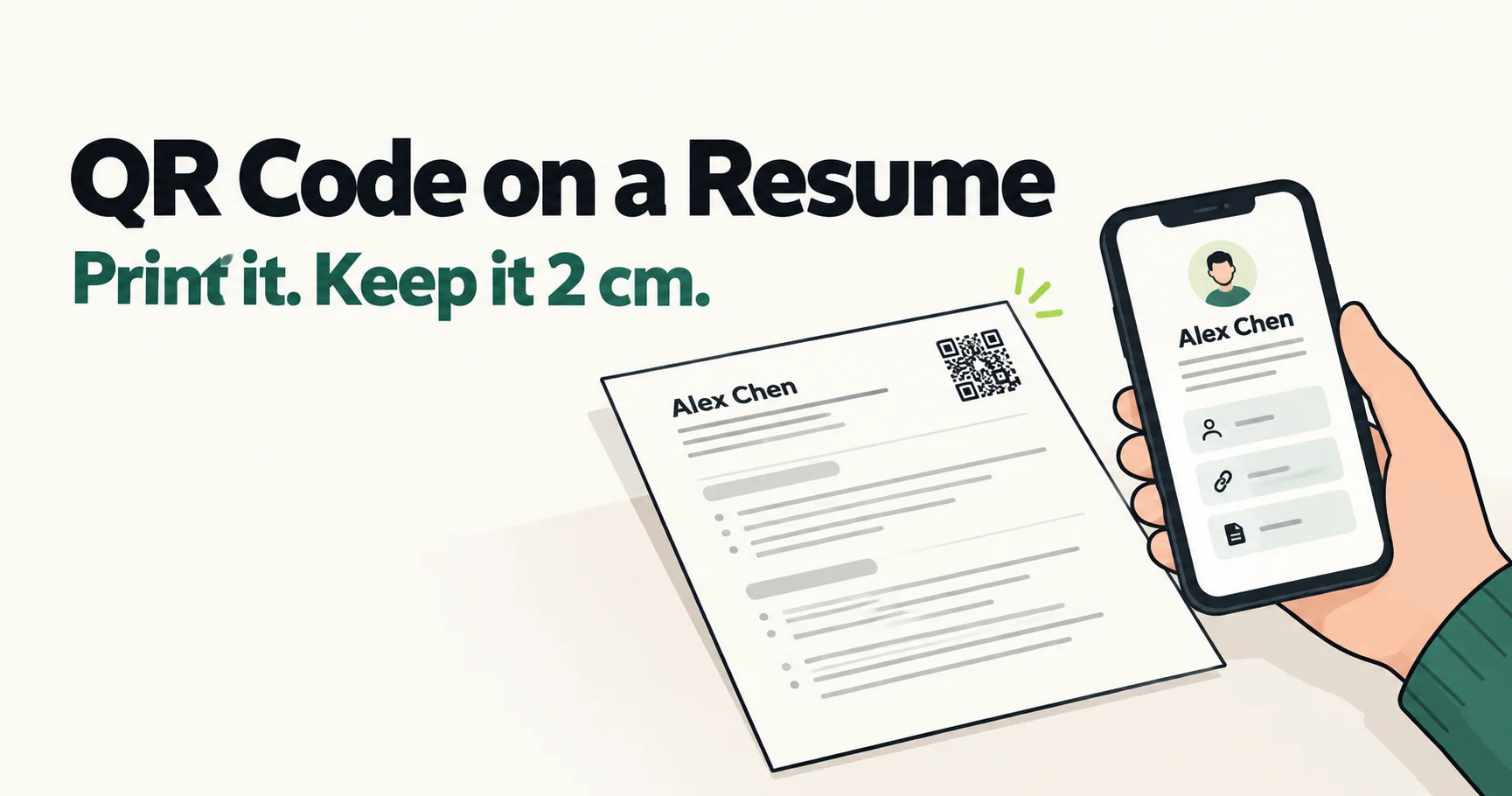
A QR code belongs on the resume you print, not on the one you upload. Applicant tracking systems read the text in your file and skip images, so on an online application the code does nothing; on paper, where nobody can click a link, it saves a recruiter typing an address. If you add one, print it at least 2 cm wide and put the short link beside it as text.
TL;DR: Keep a plain version of your resume for online applications, with your portfolio and LinkedIn written out as links, and put the QR code only on the copies you print. In a simulated phone-camera test, a 2 cm code holding a short link still scanned from 45 cm after the page was photocopied; at 1.5 cm a photocopy cut that to 20 cm, and at 1 cm it stopped scanning. A code that holds a full LinkedIn address needs about 3 cm to do what a short link does at 2 cm.
Which copy of your resume gets the code
A resume travels in 3 forms, and a QR code helps in only 1 of them.
The file you upload to a job portal. An applicant tracking system reads the words in the file and ignores images, and QR Code Generator's own guide warns that screening tools "don't recognize QR Codes at all" (source). The code costs you a corner of the page and gives the system nothing. Put your portfolio and LinkedIn in plain text on this version instead.
The PDF a recruiter reads on a screen. On a laptop or a phone, a code is the slowest way to reach your portfolio: the reader would have to pick up a second device to scan their own screen. A text link they can click does the same job in 1 tap. If your code sits on a PDF you email, put the link in text right beside it, then open the exported PDF and click it to check it survived the export.
The paper copy. Career fairs, the copy you bring to an interview, a printed portfolio, the back of a business card. On paper there is nothing to click, and this is where a code earns its space.
How small the code can be
Almost every guide gives the same minimum. QR Code Generator puts it at 2 by 2 cm (source), and TopResume repeats the figure with QR Code Generator as its source (source). None of them shows the test behind the number, and none of them says what happens when a resume has been photocopied, which is what happens to a lot of paper resumes after the first reader.
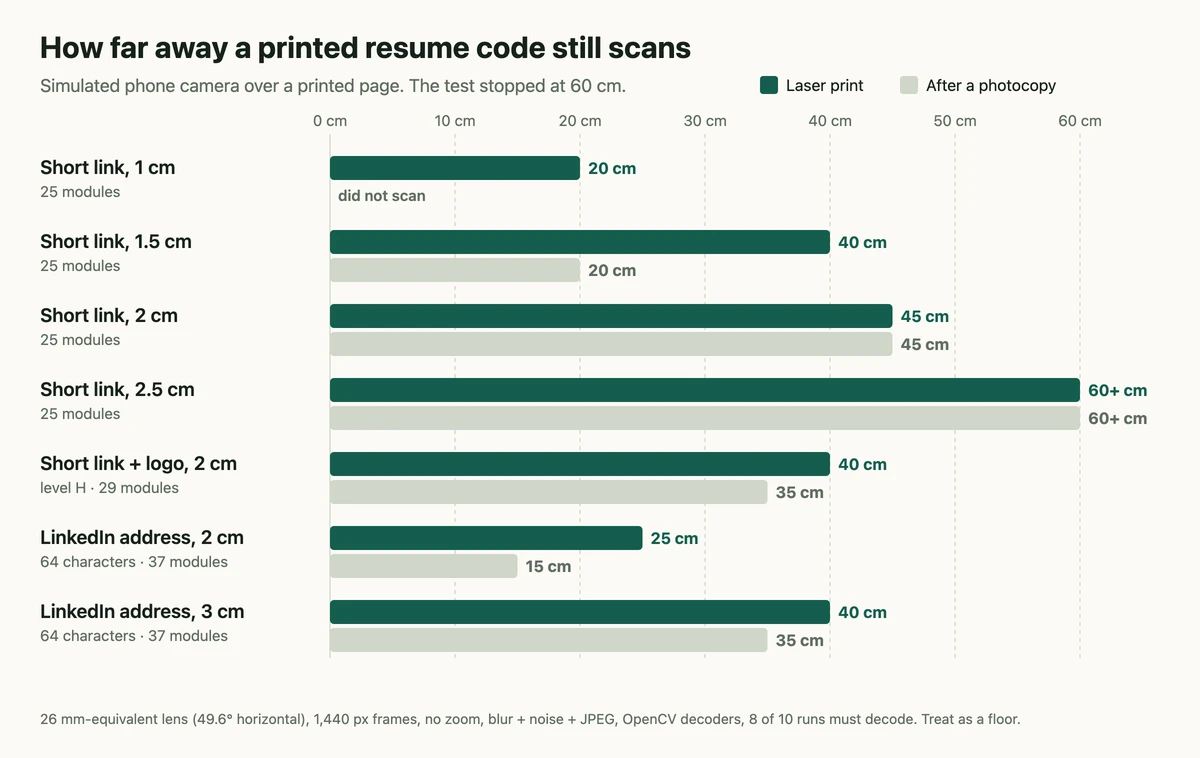
So I tested it. I created codes with this site's own encoder and ran them through a simulated phone camera looking at a printed page: the main camera's 26 mm-equivalent lens (a 49.6° horizontal field of view), analysis frames 1,440 pixels wide, no zoom, with lens blur, sensor noise and JPEG compression added. The page itself was modelled in 2 versions: an office laser print, and a photocopy of that print, with lower contrast, softer edges and toner specks. Each distance was tried 10 times, and it counted as readable when at least 8 of the 10 decoded with OpenCV's QR detectors. A phone's own decoder is stronger than OpenCV's, so read the distances as a floor. The test stopped at 60 cm, and phones cannot focus much closer than 10 cm.
| What the code holds | Printed width | Laser print | After a photocopy |
|---|---|---|---|
| A 24-character short link (25 modules across) | 1 cm | 20 cm | did not scan |
| A 24-character short link | 1.5 cm | 40 cm | 20 cm |
| A 24-character short link | 2 cm | 45 cm | 45 cm |
| A 24-character short link | 2.5 cm | 60 cm or more | 60 cm or more |
| The same short link with a logo in the middle (level H, 29 modules) | 2 cm | 40 cm | 35 cm |
| A full LinkedIn profile address, 64 characters (37 modules) | 2 cm | 25 cm | 15 cm |
| A full LinkedIn profile address | 3 cm | 40 cm | 35 cm |
The 2 cm minimum holds up. A 2 cm code with a short link scanned from 45 cm on both the original and the photocopy, which covers a recruiter holding the page or leaning over a desk. Below that, the photocopy is what breaks it: a 1.5 cm code read from 40 cm on the original and from 20 cm on the copy, and a 1 cm code did not scan at all once copied. If the page might be copied, 2 cm is the floor, not a target to shave.
A logo in the middle costs some of that margin. Putting your initials inside the code raises its error correction to level H, which adds modules, and at 2 cm the photocopied distance dropped from 45 cm to 35 cm. That is still enough for a page in someone's hands, but it is the reason to go to 2.5 cm if you want the logo.
For the general version of these rules, with contrast, the quiet zone and blurred exports, QR code not scanning? goes through each of them.
A short link or your LinkedIn address
What the code holds decides how dense it is. A code that points straight at a LinkedIn profile has to hold the whole address, and the one in the test, 64 characters long, came out at 37 modules across. At 2 cm it read from 25 cm on the original and 15 cm on a copy; it took 3 cm to get close to what a short link did at 2 cm.
A dynamic code holds only a short link, and the page behind it can be changed. That matters more on a resume than almost anywhere else, because you rewrite a resume for each application and the printed copies keep circulating. With a dynamic code, the copy handed out at a career fair in March opens the version you uploaded in September. The difference between the 2 kinds of code is explained in how QR codes work.
Where the code goes on the page
The top corner beside your contact details and the end of the last page are the 2 places a reader looks for it. The top is found first; the end is out of the way of the content. Either works, and neither changes anything for an applicant tracking system, which reads neither image.
Some advice tries to place the code around the tracking system instead. TopResume recommends putting it near your name in the contact section, and in the same article suggests burying it in the footer because "applicant tracking systems can't read header and footer text" (source). If that were true of the system reading your application, your contact details in the header would be lost as well, and tracking systems differ from each other too much to design a page around any one of them. The plain version you upload settles it: it has no code to worry about.
3 things make the code usable once it is on the page:
- Clear space around it: at least 4 modules of white on every side, which on a 2 cm code is about 3 mm. Text or a border that runs into it makes the code harder to find.
- A label: 2 or 3 words such as "Resume and portfolio", so a reader knows what the scan opens before they point a phone at it.
- The short link as text: printed next to the code, it tells the reader where the code leads, and it still works when the page is photocopied too many times or the code gets scuffed.
What the code should open
A recruiter who scans a code from a stranger's resume is taking a small risk, and some are wary of it: in 2022 the FBI warned that criminals tamper with QR codes to send people to malicious sites (IC3). A phone camera shows the address before it opens anything. A page that then shows your name and headline above the document tells the reader they have the right person before they tap.
Behind that, the most useful thing to open is the resume itself, with your portfolio, LinkedIn or GitHub 1 tap below it. Linking only to LinkedIn sends the reader to a page that looks like everyone else's; linking only to a portfolio skips the document they asked for. On this site, the resume page shows your name and headline above the PDF and up to 3 links under it, on every plan.
After the job search
A printed resume keeps travelling after you have accepted an offer, and it carries your phone number and email address. 2 things decide what happens to the code then. The first is whether the service behind it keeps resolving it: some generators switch dynamic codes off when a trial ends, and do QR codes expire? has the policies of 6 of them. The second is whether you can take the resume offline yourself. With a free account here, a code can be given an end date, 30, 60 or 90 days out or on a day you choose, and after that date a scan shows a notice instead of your resume. Moving the date puts it back online.
What this site does
QRCodeForPDF is a free, browser-based generator that turns a PDF or an audio file into a dynamic QR code with a hosted page; codes created without an account expire 7 days after creation, codes held in any account, free or paid, have no expiry date, and the file behind a printed code can be replaced without reprinting. For a resume, that means the code on your printed copies can open the version you tailored for the next application, and replacing the PDF is free on every plan.
It does not help with the upload. A QR code does not get a resume past an applicant tracking system, and nothing on this site parses or scores a resume. What it does is give the paper copy the link it cannot otherwise have.
Create a code for your resume, print 1 test page at the size you plan to use, and scan it from where a recruiter would hold it before you print the batch.